Your giving page, on its best day
Picture it: it's the Monday after Thanksgiving. Your Giving Tuesday email is scheduled, your board chair has promised to share the link, and you open your donation page one last time on your phone. And your heart sinks. The text is a little small. The form is a little long. And it asks for a fax number. Who even sends faxes anymore?
That's the last thing you want to happen when you're running a fundraising campaign. No matter how much your donors believe in your mission, if your fundraising page is complicated or doesn't communicate that mission, you might not achieve your fundraising goals.
That's why we rebuilt MonkeyPod's fundraising pages, so you never have to worry if your form looks right. Pages and forms are more customizable than ever, so you can communicate your mission exactly how you envisioned it.
And as of today, all of it is live in your MonkeyPod.
Three new page designs
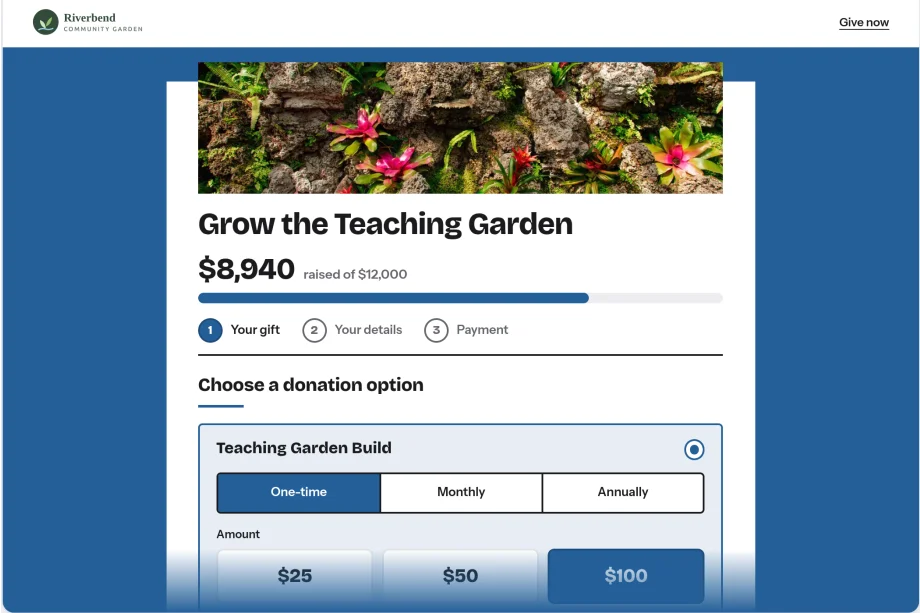
Every Fundraising Page can now use one of three new designs, all built to look modern, match your brand, and work on any device.
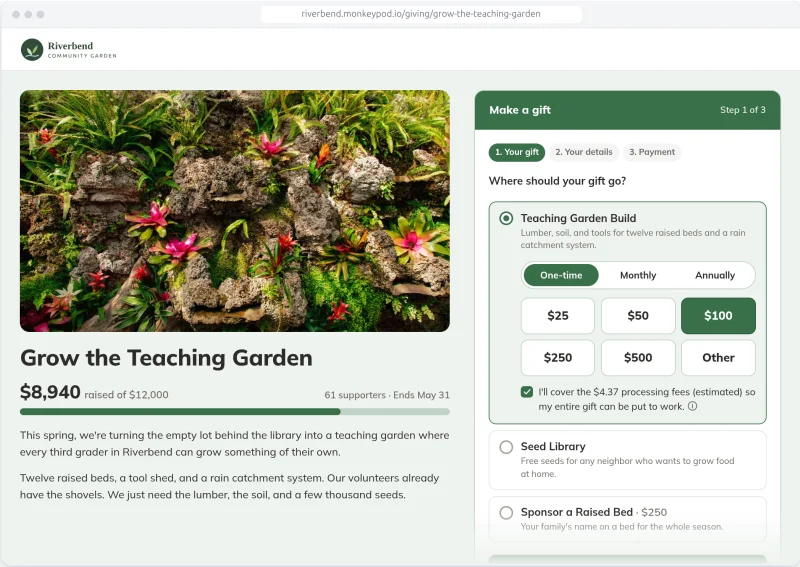
Maui puts your story on one side and a gift form that stays in view on the other. It's the default for every new page.
Hawaiʻi floods the page with your organization's color, with the form on a single clean sheet.
Kauaʻi reads like an editorial letter, with your logo and campaign figures alongside.
All three walk donors through the gift one step at a time: amount, details, an optional dedication, then payment. They pull from the colors, logo, banner and thank-you image you've already set up, so there's no redesign project hiding in here.
Your existing pages keep their current design until you decide to switch. Every page, even our classic designs, also gets an accessibility upgrade: donors can choose gift options with a keyboard, text is at least 16 pixels, and colors meet WCAG AA contrast, including text on top of your brand color.
A form that asks for exactly what you need
You know which information your organization uses. Now the form does too.
A supporter can split a single gift between, say, your scholarship fund and your general fund, each with its own amount, so they can give to exactly the program they are invested in.
Contact information like name, email, and phone number can be added or removed and set to required, optional or hidden, page by page.
Add custom questions (like "Which volunteer opportunities interest you?") that save directly to the donor's record in your CRM.
Put it right on your website
Any page on a new design can now be embedded on your own website. Copy the code from the page's Embed tab, paste it into your site, and donors see your title, progress bar and form without ever leaving. Apple Pay and Google Pay work right inside it. If you want a pixel-perfect match with the rest of your site, the Customize Design (Advanced) button lets you adjust the styling of each part of the embedded page.
By the way, if you're still using MonkeyPod's older Donation Forms, they'll keep working. When you're ready for an upgrade, the updated fundraising pages are ready for you.
Easier to share, easier to renew
When you turn on social sharing, your page and its thank-you screen now show a simple "Share this page" row: Facebook, LinkedIn, Bluesky, email and copy link. It's a small thing, until your most enthusiastic donor wants to spread the word the moment after they give.
If you use Member HQ, members with donation-based memberships can now renew right from their Community Portal. They'll see a Renew Membership section, enter a card, and that's it. The renewal is recorded and receipted like any other gift, with no behind-the-scenes form to manage.
Receipts without the year-end weekend
Receipts got serious attention too, because you told us they eat more time than anyone admits.
Every emailed receipt now includes a PDF copy, and you can download any receipt as a PDF.
Print up to 250 receipts into a single PDF for donors who prefer paper.
Find every gift that hasn't been receipted with a new receipt status filter.
Mark donor-advised fund sponsors "Do not receipt" so they stop showing up as loose ends.
Save your favorite intro text, format it with bold and links, and change "Sincerely" to something that sounds a little more sincere.
See what's working (and where donors drop off)
The new Online Conversion report shows how many visitors view your page, choose an amount, enter their details, attempt payment and finish. When someone stops partway, you'll know where, and in many cases who.
What happens after the gift is the MonkeyPod part
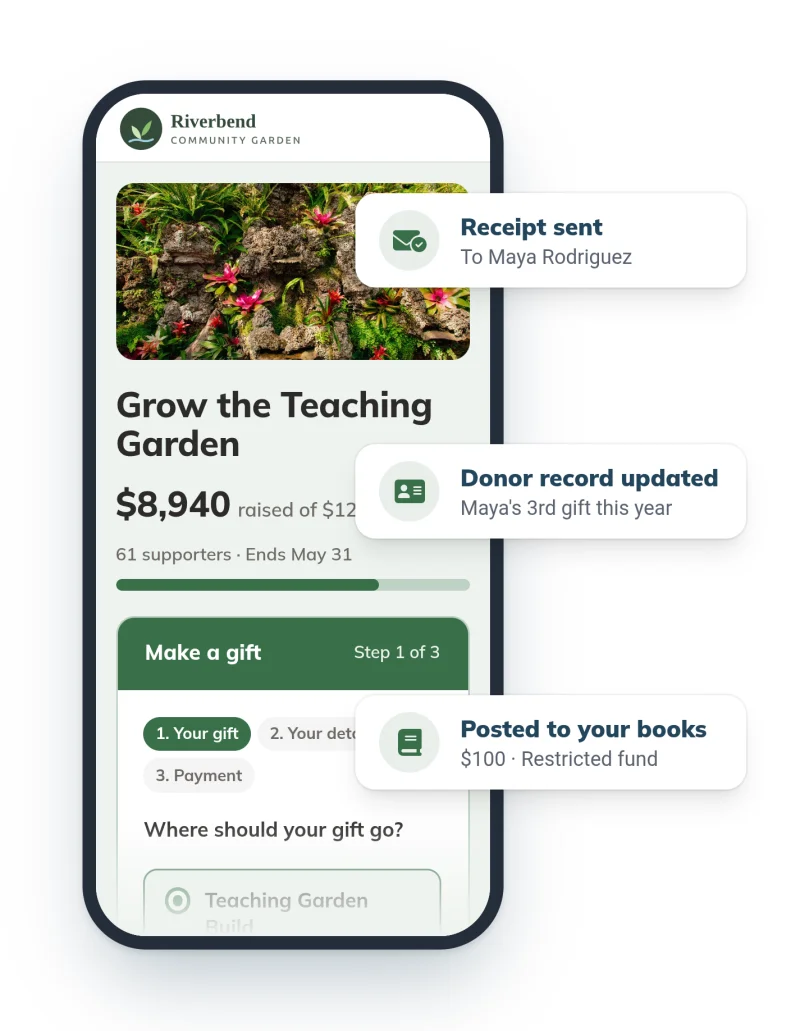
Plenty of tools can make a nice donation page. What makes MonkeyPod different is everything that happens after someone clicks "Give." The gift is recorded in your CRM, posted to your nonprofit fund accounting, and receipted automatically. Even when a donor splits one gift across several funds, each piece lands in the right place.
No exporting. No re-entering. No second version of the truth.
See it for yourself
Already using MonkeyPod? Everything above is live in your account right now. Open any Fundraising Page and start with the Visual Design tab.
New to MonkeyPod? We'd love to show you how giving pages, donor management and fund accounting work together in one place. Schedule a demo, or if you'd prefer to explore on your own first, start a 14-day free trial, no credit card required.